

CoreSentry

Unified GRC Platform for SAP On-Premise and Cloud Applications

CoreSentry Private runs within your own network and on your own servers. Built with an agile architecture, it connects cloud and non-cloud applications without adding another bridge, so your data stays within your environment.

CoreSentry connects SAP ECC, SAP S/4HANA, SAP BTP, SAP Ariba, SAP IBP, Salesforce and SharePoint directly with no bridge or middleware. It brings six integrated modules into one platform.

Governs access across on-premise, cloud and non-SAP applications

On-premise
  • SAP ECC
  • SAP S/4HANA
  • SAP BW
Cloud
  • SAP BTP
  • SAP Ariba
  • SAP IBP
Non-SAP
  • Salesforce
  • SharePoint

Access Is Spread Across Every System

Each application brings its own controls, owners and risks. CoreSentry Private brings them into a single platform for governance, risk and compliance.

  • Freedom to Connect

    CoreSentry Private connects on-premise and cloud SAP applications, along with Salesforce and SharePoint, directly from your landscape. There is no separate bridge or middleware to install, license or maintain.

    SAP ECC, S/4HANA and BW on-premise. SAP BTP, Ariba and IBP in the cloud.

  • Agility to Adapt

    An agile architecture lets CoreSentry adapt to the way your organization works. Configure multi-stage approval paths without coding, extend the ruleset and add applications as your landscape grows.

    New capabilities ship in short release cycles, shaped by customer requests.

  • Intelligence to Act

    Real-time risk analysis helps teams see risks clearly and act quickly. Precomputed SoD analysis, plain-language AI risk summaries and Risk Patrol alerts on actual activity give every decision the context it needs.

    AI is designed to run on a lightweight local model inside your landscape.

  • Simplicity to Govern

    A clean and intuitive interface makes access governance easier for the people who use it every day. Screens follow SAP Fiori guidelines, so the patterns are already familiar to SAP users.

    Requests follow a guided four-step flow on calm, clutter-free screens.

See an Access Request from Start to Finish

These are real CoreSentry screens. A request moves through role selection, risk analysis and approval in one guided flow.

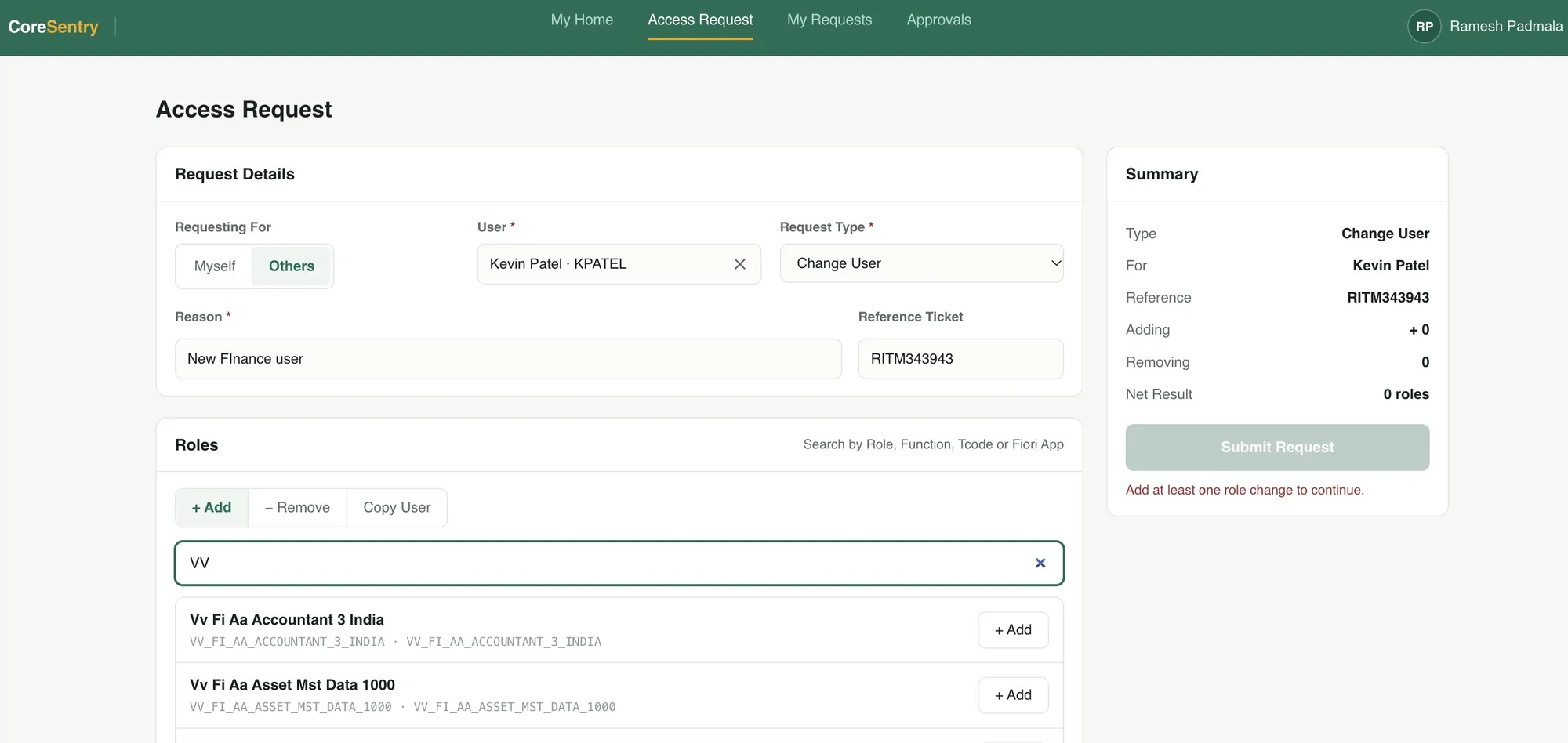
Request Details

Request access for yourself or on behalf of others. A reason is required and a reference ticket can be added for traceability.

CoreSentry access request page with request details for Kevin Patel and a role search

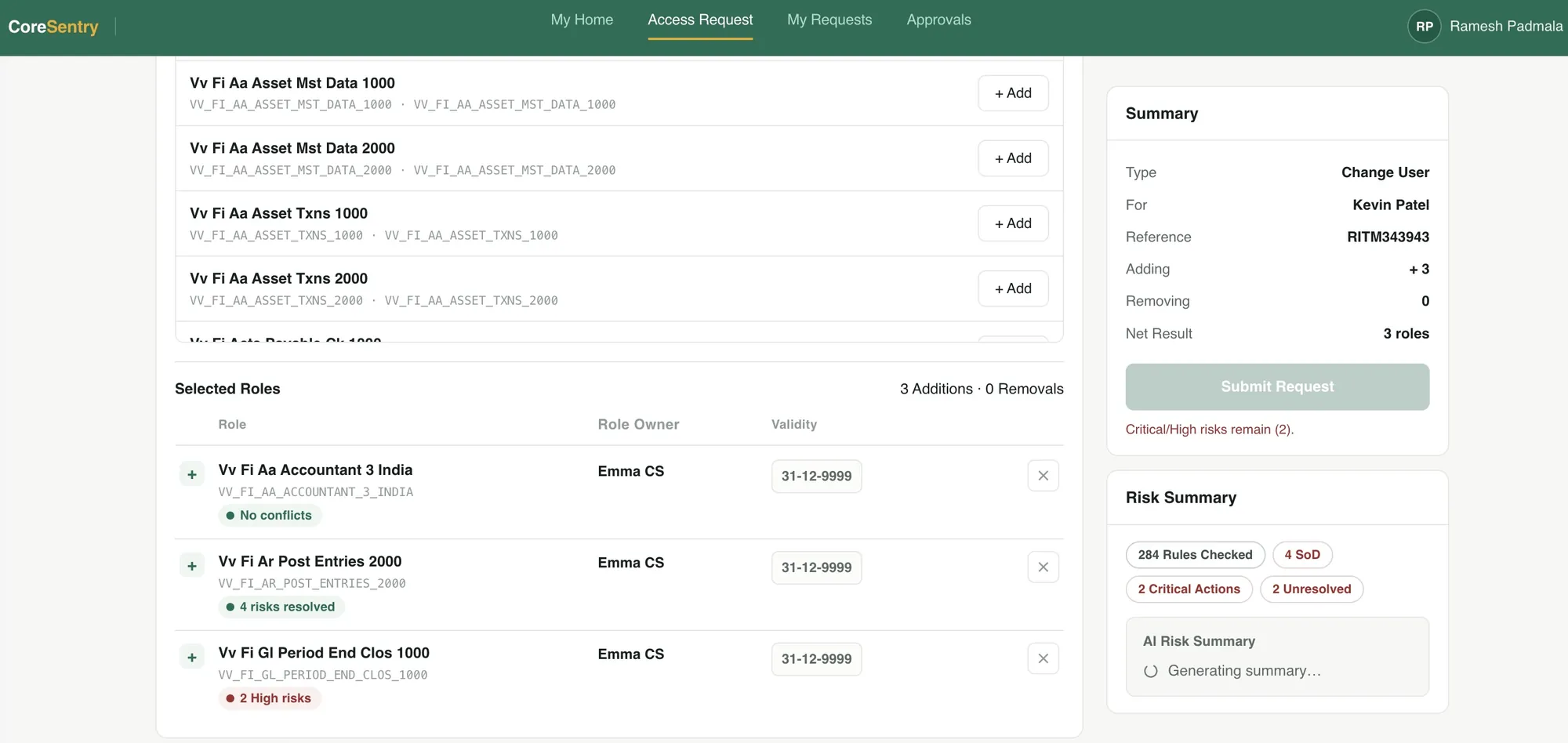
Role Selection

Search roles by name, function, transaction or Fiori app. Each selected role shows its owner, its validity and whether it introduces a conflict.

Selected roles with role owner, validity and conflict status next to the request summary

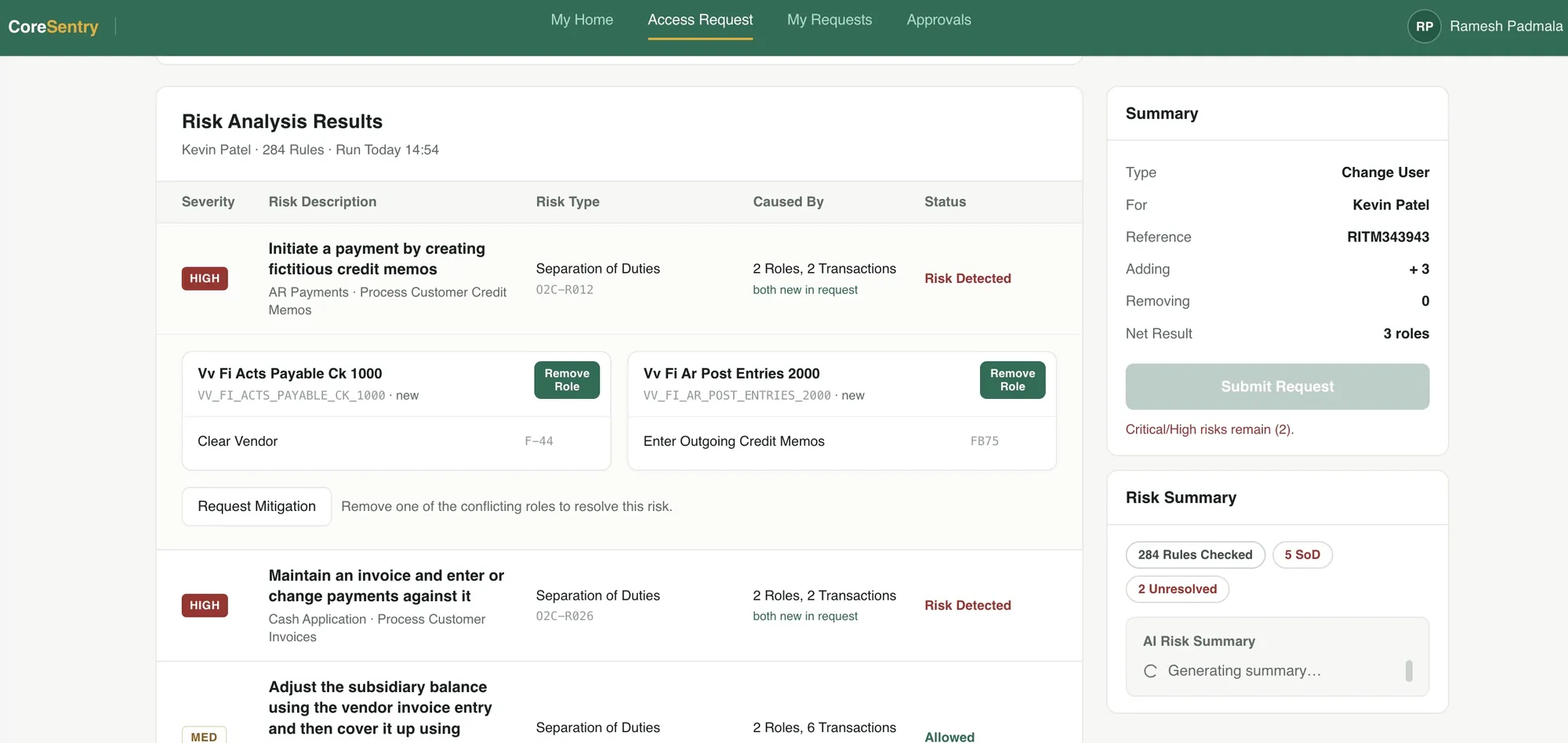
Risk Analysis

SoD analysis runs before anything is provisioned. Critical and high risks must be addressed before the request can be submitted.

Risk analysis results with a high risk expanded to show the two roles that cause it

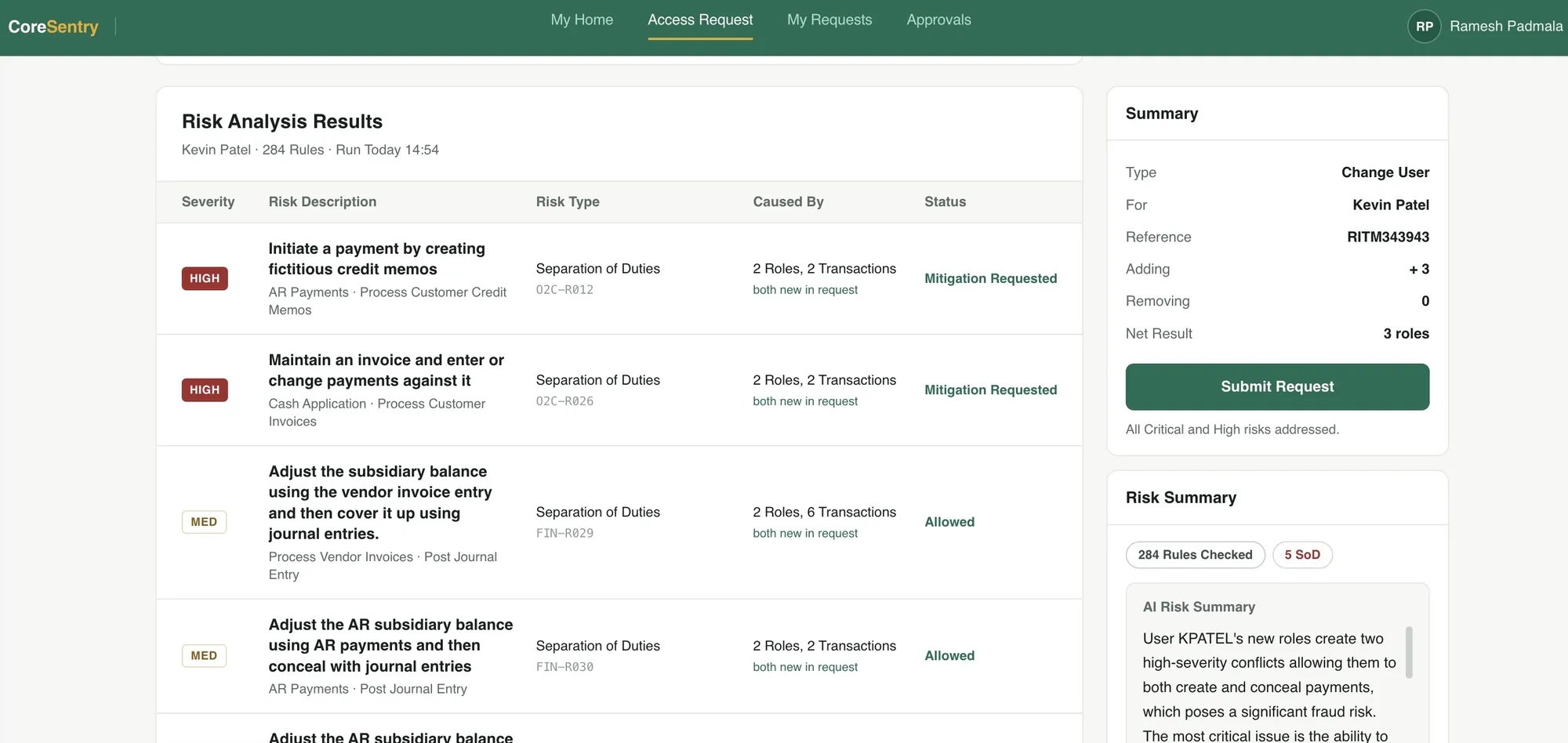
Risk Resolution

Remove a conflicting role or request a mitigation. An AI risk summary explains the exposure in plain language for approvers.

Risk analysis with mitigation requested for both high risks and an AI risk summary

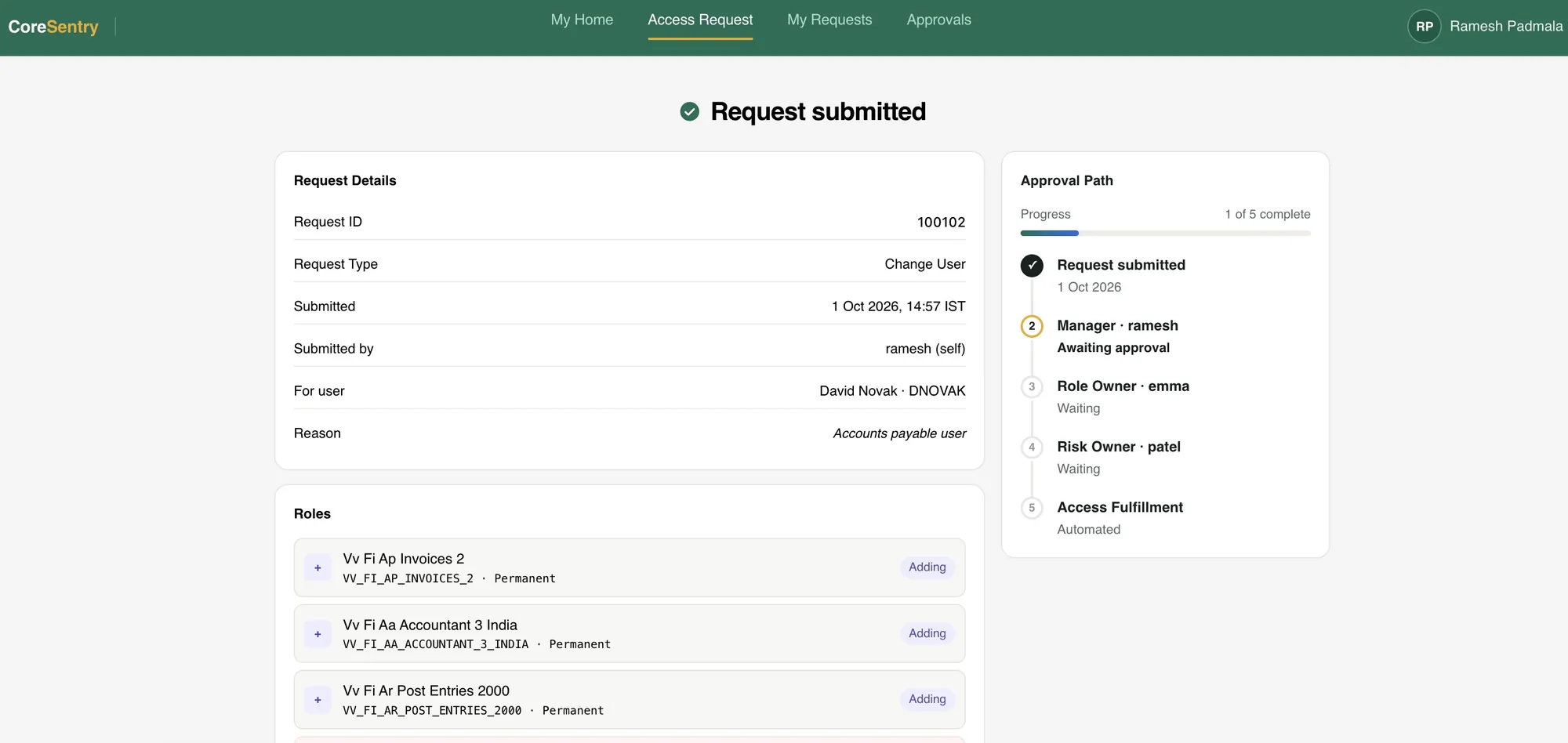
Submission

The request follows its approval path: manager, role owner and risk owner, then automated access fulfillment.

Request submitted page with request details, role changes and a five-step approval path

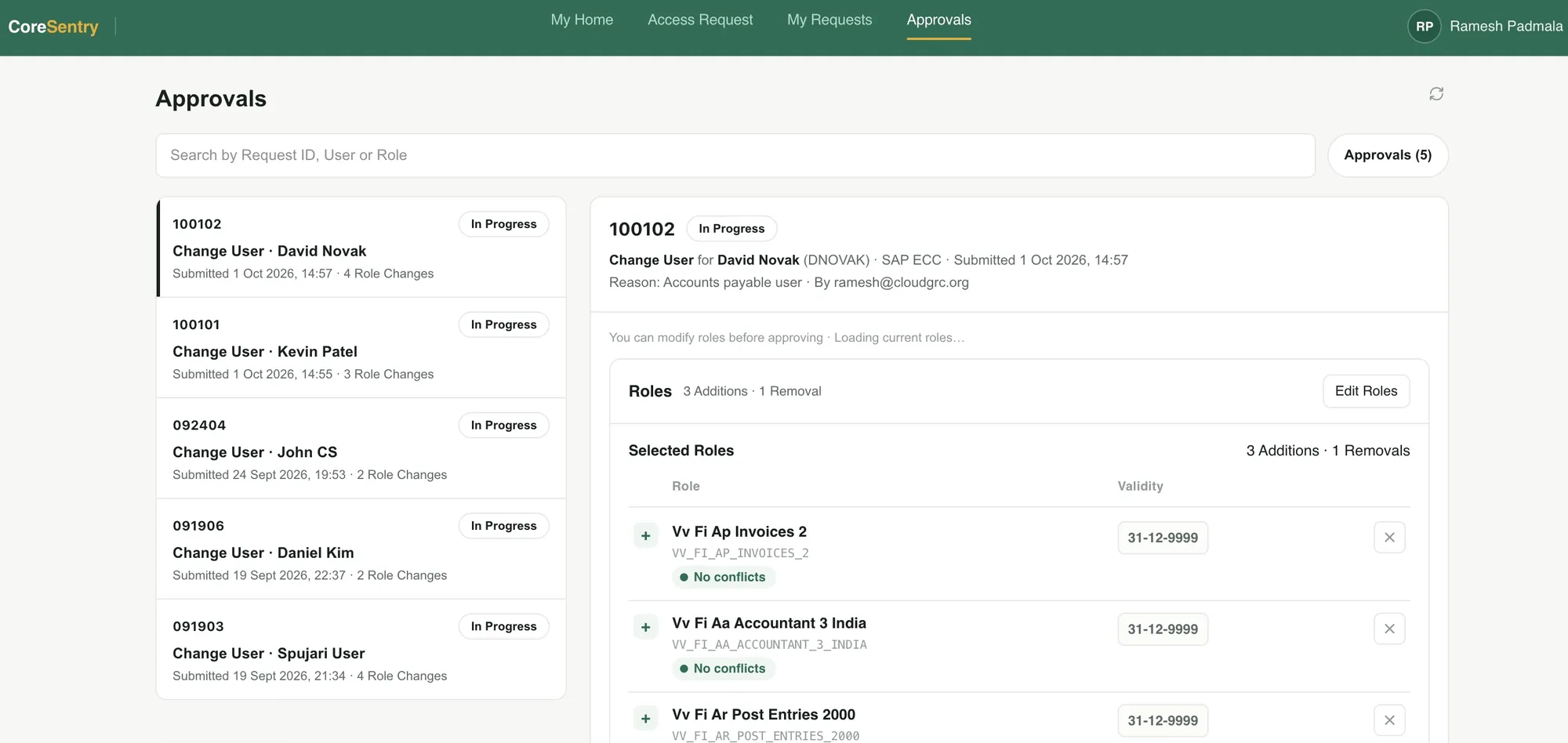
Approval

Approvers review role changes and conflict status in one place. They can adjust roles before they approve.

Approvals inbox with a change user request open for review

Six Integrated Modules Across Your Entire Landscape

Every module runs on the same platform, ruleset and AI layer, inside your landscape.

  • Access Requests

    Request, change or remove access for yourself or for others. Find roles by function, transaction or Fiori app and set validity per role.

    Explore Access Requests
  • SoD Risk Analysis

    Precomputed separation of duties analysis against our own ruleset, with every risk traced to the permissions behind it.

    Explore Risk Analysis
  • JPA Elevated Access

    JIT Privileged Access gives IT users time-bound elevated access through their own user IDs, with a full log of every session.

    Explore Elevated Access
  • Access Reviews

    Periodic certification campaigns for managers and role owners, with complete evidence kept for auditors.

    Explore Access Reviews
  • Risk Patrol

    Continuous monitoring of the activity users actually perform, with alerts when conflicting steps happen on the same business object.

    Explore Risk Patrol
  • AI Insights

    Plain-language risk summaries, AI review of elevated access logs and contextual guidance on every request and page.

    Explore AI Insights

Also Included

  • Ruleset ManagementOur own SoD ruleset, maintained and extendable.
  • Mitigation ControlsControls, owners and monitors in one place.
  • Workflow DesignerMulti-stage approval paths without coding.
  • Audit ReportsReady reports for auditors and security teams.

Runs Within Your Own Network

CoreSentry Private runs within your own network and on your own servers, so your data stays within your environment.

  • Direct connections to on-premise and cloud applications, with no bridge or middleware
  • Standard SAP interfaces, with a CoreSentry ABAP add-on on connected systems that we deliver and maintain
  • Application data stored in PostgreSQL on servers you control
  • AI designed to run on a lightweight local model, with every AI action logged for administrators
CoreSentry Private inside your network CoreSentry Private runs on your servers inside your network. It connects directly to SAP ECC, SAP S/4HANA and SAP BW inside the network, to SAP BTP, SAP Ariba and SAP IBP in the cloud and to Salesforce and SharePoint. There is no bridge or middleware between them. Your network SAP ECC SAP S/4HANA SAP BW CoreSentry PrivateApplication, database and local AI Your users and approvers Cloud SAP BTP SAP Ariba SAP IBP Non-SAP Salesforce SharePoint Direct connections. No bridge or middleware. CoreSentry Private inside your network CoreSentry Private runs on your servers inside your network. It connects directly to SAP ECC, SAP S/4HANA and SAP BW inside the network, to SAP BTP, SAP Ariba and SAP IBP in the cloud and to Salesforce and SharePoint. There is no bridge or middleware between them. Your network SAP ECC SAP S/4HANA SAP BW CoreSentry PrivateApplication, database and local AI Your users and approvers Cloud SAP BTP SAP Ariba SAP IBP Non-SAP Salesforce SharePoint
Direct connections. No bridge or middleware.

We Implement It for You

Our consultants run the deployment end to end, so your team can focus on the business.

  1. 1

    Prerequisites

    Your team readies the landscape.

  2. 2

    Connect

    ABAP add-on and system connectors.

  3. 3

    Configure

    Ruleset, owners and workflows.

  4. 4

    Test

    Validated with your team.

  5. 5

    Go Live

    Handover and training.

Standard deployment takes 4 weeks from completed prerequisites. It is included at no extra charge.

Custom requirements are delivered on demand by our consulting team.

Choose Your Edition

CoreSentry Private runs inside your network. CoreSentry Cloud is a subscription service for SAP Public Cloud customers.

CoreSentry Private

For organizations that want governance inside their own network

Custom quoteafter an assessment

  • Runs on your servers, so your data stays in your environment
  • Governs on-premise and cloud SAP applications, Salesforce and SharePoint
  • Standard deployment in 4 weeks, included

CoreSentry Cloud

For SAP Public Cloud and SAP Cloud ERP customers

$999per month, starting price

  • Covers S/4HANA Cloud, BTP, Ariba and SAC
  • Zero footprint on your SAP systems, with no custom code
  • Deployment from 2 weeks with a free guided pilot
Ramesh Padmala, Founder and CEO, CloudGRC

“We put a lot of thought, time and heart into building this.”

CoreSentry is designed by the same SAP Security consultants who deploy and support it. Every screen reflects more than 17 years of hands-on SAP Security and GRC work.

See CoreSentry in Your Landscape

Three simple steps to get started.

  1. 1Discovery CallUnderstand your landscape and goals
  2. 2Live DemoCoreSentry on real scenarios
  3. 3Deployment PlanPrerequisites, scope and timeline