
One Platform for Every Access Decision
CoreSentry runs inside your landscape and governs on-premise and cloud SAP applications with no separate bridge. Six modules share one ruleset and one AI layer.
Access Requests Business Users Understand
Requests move through a guided four-step flow built on SAP Fiori guidelines, so the patterns are familiar from the first use.
- 1Request Details
- 2Role Changes
- 3Risk Analysis
- 4Review and Submit
- Request, change or remove access for yourself or for others
- Find roles by name, function, transaction or Fiori app
- Set validity per role, from permanent to time-bound
- Copy access from a reference user
Risk Detection That Explains Itself
Our SoD ruleset is built from first principles. It is independent, transparent and maintained by our team.
- Functions
- Actions
- Permissions
- Risks
- Ruleset
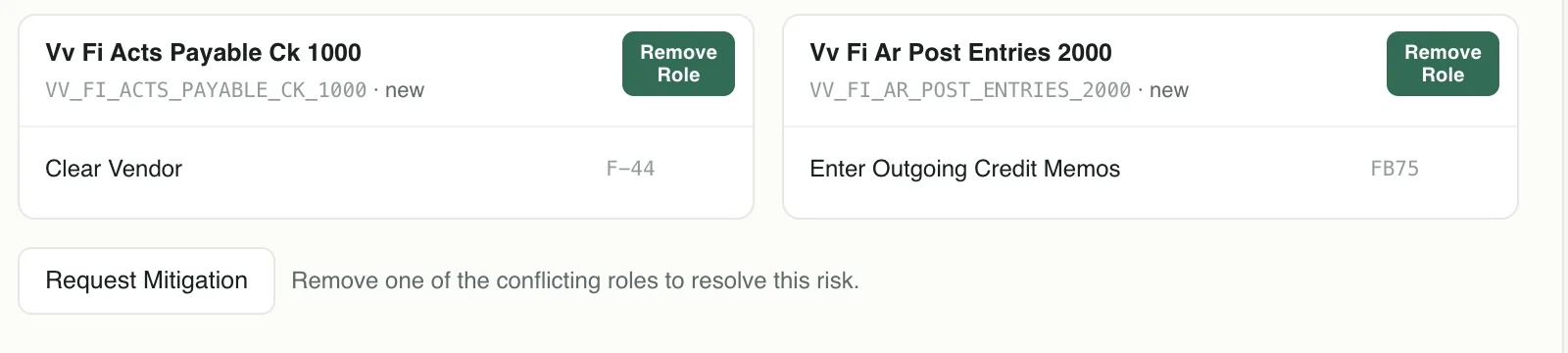
Every risk traces back to the exact permissions behind it.
- Precomputed for SpeedAnalysis results are ready when a request needs them.
- Resolve Every ConflictRemove the role, add a mitigation control or accept the risk.
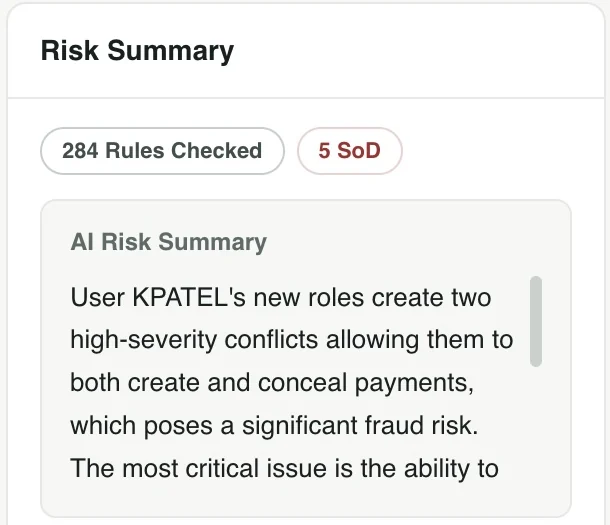
- AI Risk SummariesPlain-language explanations for approvers and business users.
Approval Paths Without Coding
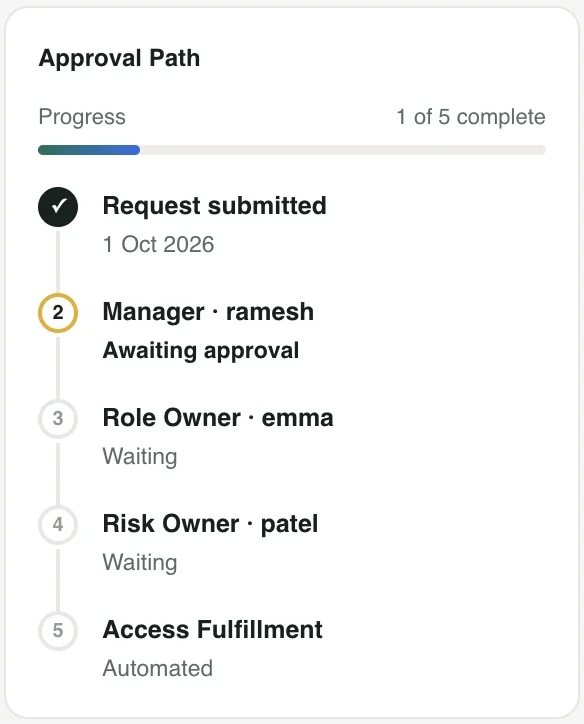
The Workflow Designer sets up multi-stage approval paths that match how your organization makes decisions. Each request follows the path that applies to it.
- Manager, role owner and risk owner stages in the order you define
- Approvers can adjust roles before they approve
- Access fulfillment runs automatically once approvals are complete
- Requesters can follow the progress of every request
Elevated Access, Reviewed by AI
JIT Privileged Access (JPA) gives IT users time-bound elevated access with a full audit trail.
- 1
Request
With reason and validity
- 2
Approve
Owner approves the window
- 3
Start
Role assigned only now
- 4
Work
Activity captured
- 5
End
Role removed instantly
No Shared Firefighter IDs
Elevated access is role based. People work under their own user IDs, so every action is attributable.
AI-Powered Log Review
Change documents and Security Audit Log entries are collected for every session. The AI layer validates activity against the approved request, highlights anything unusual and drafts a summary so reviewers sign off in minutes.
Concurrent Sessions
Users can hold elevated sessions across roles and systems at the same time.
Risk Patrol: See Risk as It Happens
SoD rules show who could misuse access. Risk Patrol shows who actually performed conflicting steps and acts on it.
- Correlates the same user, the same time window and the same business object
- Offers two responses from the alert: notify the owner or block the user
- Uses the CoreSentry ruleset and ABAP add-on
- Runs with CoreSentry or on its own
Maintain Vendor and Pay Vendor
- Changed vendor bank details
- Posted payment to the same vendor
- Same user
- Same time window
- Same business object
Reviews, Controls and Reports
Ongoing governance between audits, with the evidence kept in one place.
Access Reviews
Periodic certification campaigns for managers and role owners, with complete evidence for internal and external audits.
Mitigation Controls
Controls, owners and monitors in one place, linked to the risks they cover.
Ruleset Management
Our own SoD ruleset, maintained by CloudGRC and extendable for your organization.
Audit Reports
Ready reports for auditors and security teams, with risks, mitigations and review evidence together.
AI Built into Every Module
The CoreSentry AI layer gives helpful context on every request, page and report. It is designed to run on a lightweight local model inside your landscape.
Stays in Your Landscape
Designed to run alongside CoreSentry on your servers, so prompts and results stay within your environment.
Fully Transparent
Every AI action is logged and visible to administrators.
Where the Work Happens
Guidance appears on requests, approvals, reviews and reports rather than in a separate tool.
- Access requests
- Risk explanations
- Mitigation guidance
- JPA log validation
- Access reviews
- Reports and KPIs
- Contextual guidance

- 1Discovery CallUnderstand your landscape and goals
- 2Live DemoCoreSentry on real scenarios
- 3Deployment PlanPrerequisites, scope and timeline